The silver layer is where messy data becomes trustworthy. There are four steps: explore the data, clean it, validate it and document it.
1. Explore the data
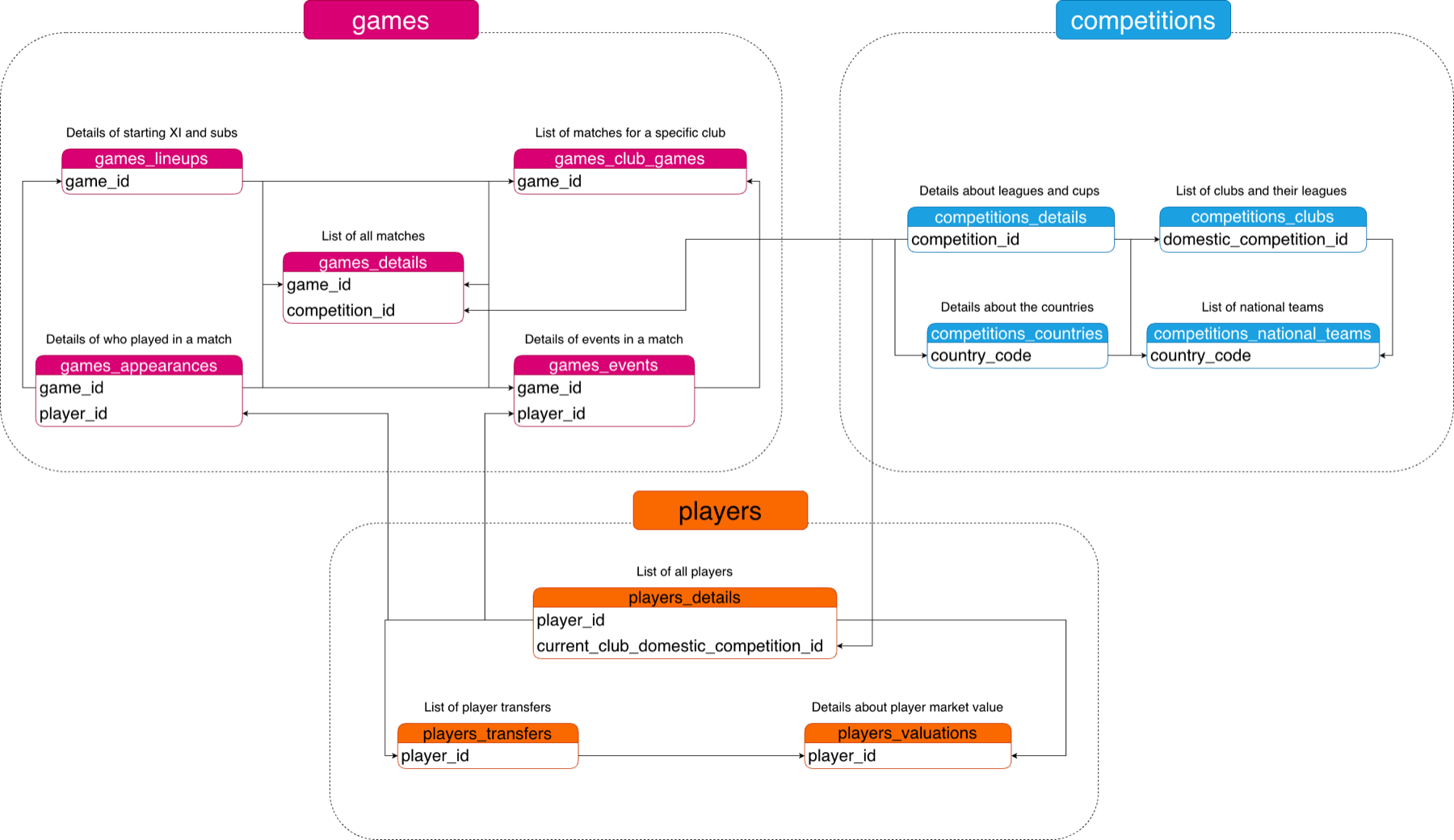
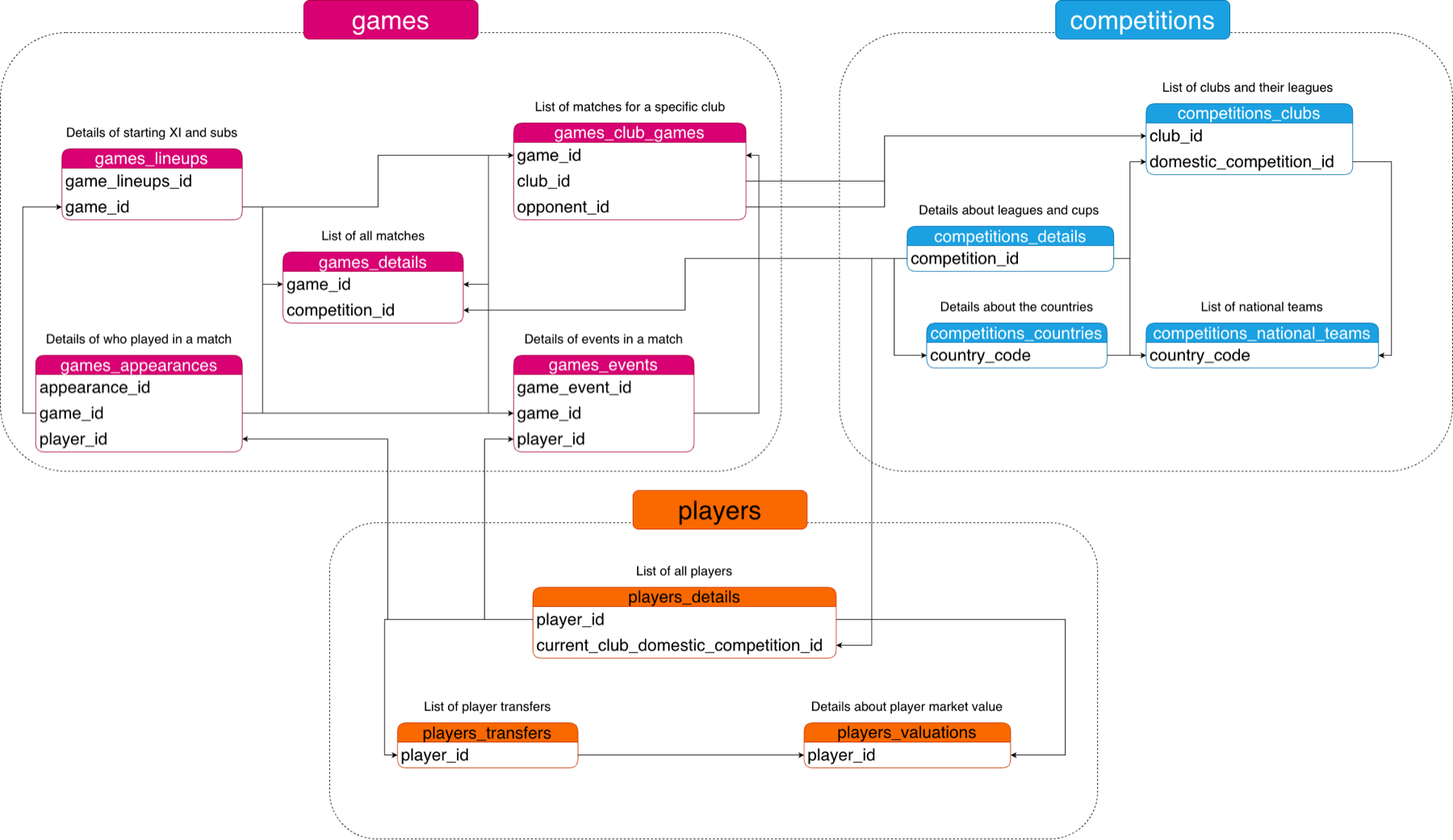
First I needed to understand what each table contains and how the tables connect. I went through them one by one, looking for fields shared between tables — for example, competitions_countries and competitions_details both have a country_id.
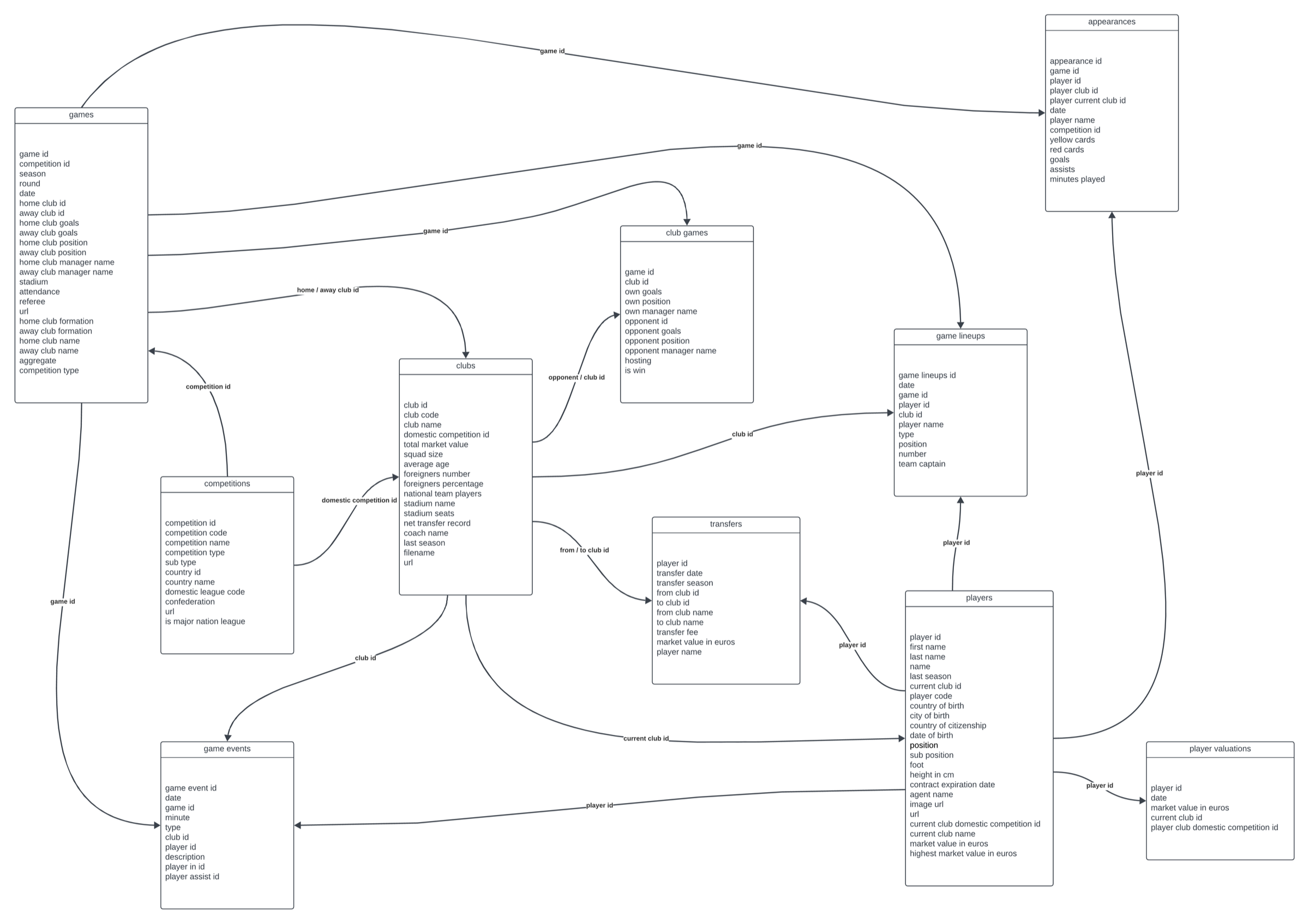
But matching on common field names isn't enough. A proper connection needs a primary key — unique and never null — on one side, and a foreign key on the other.
2. Add metadata columns
The silver tables start as copies of the bronze tables. But I also added metadata columns — extra columns that don't come from the source, added by the data engineer. Common examples are a load timestamp, a last-updated timestamp, the source system, and the source file. They make debugging much easier months later, when you've forgotten the details.
CREATE TABLE IF NOT EXISTS silver.players_valuations (
    player_id INTEGER,
    date TEXT,
    market_value_in_eur NUMERIC,
    current_club_name TEXT,
    current_club_id INTEGER,
    player_club_domestic_competition_id TEXT,
    dwh_created_at TIMESTAMP DEFAULT CURRENT_TIMESTAMP  -- metadata column
);
3. Check data quality
Primary keys: unique and not null
The first check is always the primary key. Group by the ID and look for anything that appears more than once, or is missing. The expected result is no rows at all.
SELECT player_id, COUNT(*)
FROM bronze.players_details
GROUP BY player_id
HAVING COUNT(*) > 1 OR player_id IS NULL;
When duplicates aren't really duplicates
Running the same check on transfers returned lots of “duplicates”. But players move clubs many times in a career, so the same player_id appearing repeatedly is expected. The real question is whether the same transfer appears twice:
SELECT player_id, transfer_date, from_club_id, to_club_id, COUNT(*)
FROM bronze.players_transfers
GROUP BY player_id, transfer_date, from_club_id, to_club_id
HAVING COUNT(*) > 1;  -- no rows: no real duplicates
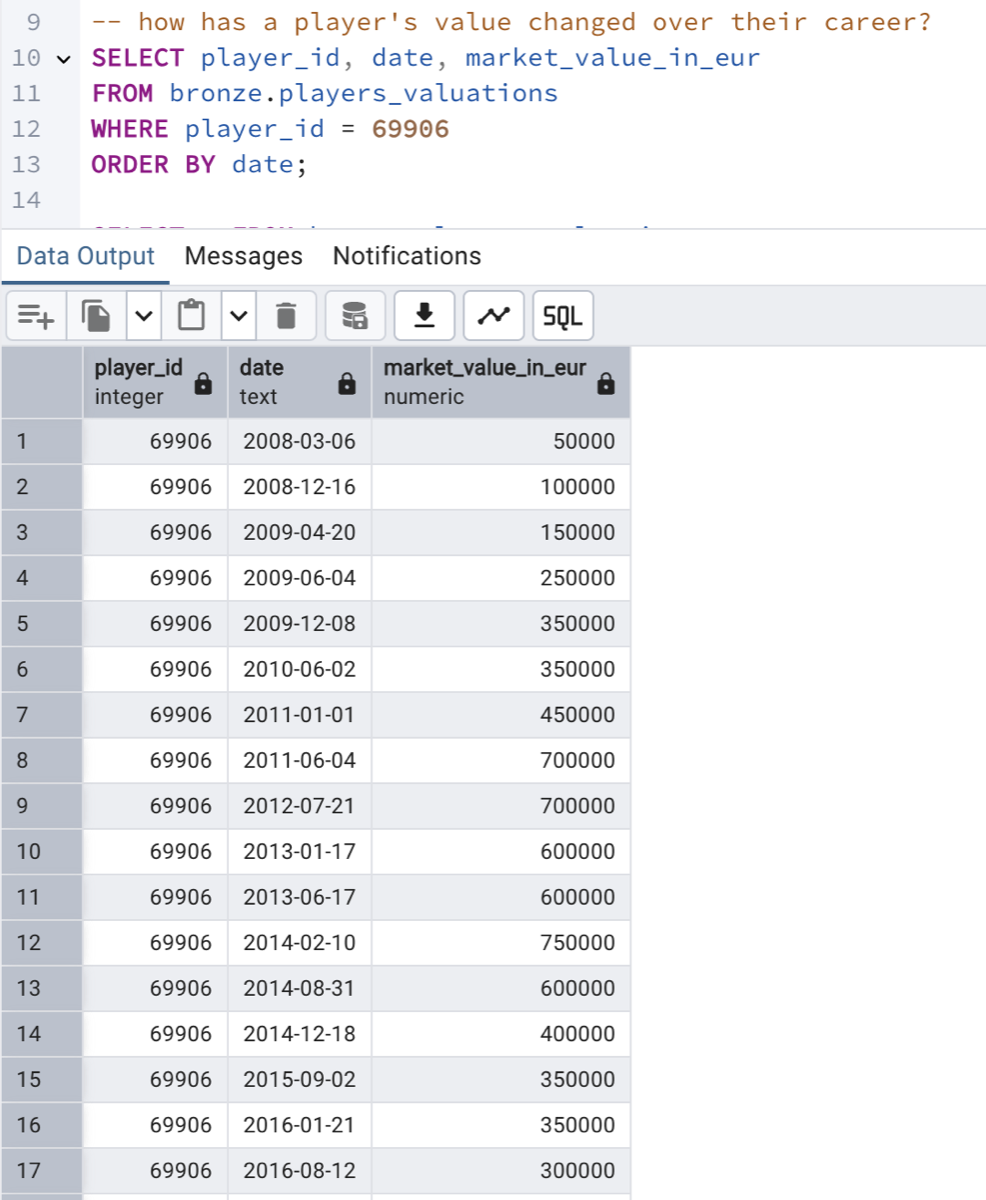
Player valuations were similar. I kept every row, because the history is valuable: it lets you analyse how a player's value changes over their career.
One-to-many relationships
The games_club_games table did have repeated game_ids. Looking at a single game explained why: every game has exactly two rows, one for the home team and one for the away team. That's a one-to-many relationship, not bad data. If you need one row per game, you can pivot the two rows into one:
SELECT
    game_id,
    MAX(CASE WHEN hosting = 'Home' THEN club_id END)   AS home_club_id,
    MAX(CASE WHEN hosting = 'Away' THEN club_id END)   AS away_club_id,
    MAX(CASE WHEN hosting = 'Home' THEN own_goals END) AS home_goals,
    MAX(CASE WHEN hosting = 'Away' THEN own_goals END) AS away_goals
FROM silver.games_club_games
GROUP BY game_id;
4. Clean the data
Next, I went column by column through every table with this checklist:
- Primary keys are unique and not null
- No unwanted spaces in text
- Coded values mapped to readable descriptions
- Consistent categories (fix spelling variants instead of dropping them)
- Missing values replaced with a clear default like
N/A - One record per key — keep the most relevant, e.g. the most recent
- Useful derived columns added
- Bad data handled, e.g. birth dates in the future
- Tables can be joined as the integration model says
- Columns that definitely aren't needed are dropped
Here are some of the real problems I found in the football data.
Inconsistent country and confederation names
The same country appeared under different names across tables, and confederations were spelt in German. Left alone, these would break joins and groupings later.
CASE
    WHEN country_name = 'Türkiye'      THEN 'Turkey'
    WHEN country_name = 'Korea, South' THEN 'South Korea'
    ELSE country_name
END AS country_name,
CASE confederation
    WHEN 'europa'  THEN 'Europe'
    WHEN 'amerika' THEN 'America'
    WHEN 'afrika'  THEN 'Africa'
    WHEN 'asien'   THEN 'Asia'
    ELSE confederation
END AS confederation
Coded values
Clubs had a competition code like GB1 but no country, so I derived one:
CASE domestic_competition_id
    WHEN 'GB1' THEN 'England'
    WHEN 'ES1' THEN 'Spain'
    WHEN 'IT1' THEN 'Italy'
    WHEN 'L1'  THEN 'Germany'
    WHEN 'FR1' THEN 'France'
    -- ...30+ leagues in total
    ELSE 'Unknown'
END AS country
Impossible formations
Some recorded formations couldn't happen on a real pitch, like 0-10-0 or 7-2-1. Others were written backwards (3-2-5 for a 5-3-2) or with extra labels (4-4-2 Diamond).
CASE
    WHEN home_club_formation IN ('0-10-0', '7-2-1', '5-5-0', '6-4-0', '2-2-6' /* ... */) THEN 'N/A'
    WHEN home_club_formation = '3-2-5'            THEN '5-3-2'
    WHEN home_club_formation = '4-3-3 Attacking'  THEN '4-3-3'
    WHEN home_club_formation = '4-4-2 Diamond'    THEN '4-4-2'
    ELSE COALESCE(home_club_formation, 'N/A')
END AS home_club_formation
Messy round names
The same stage of a competition had many names — last 16 and Round of 16, German names like Vorrunde, and even a stray |. I grouped them into consistent stages:
CASE
    WHEN round ILIKE 'group%'        THEN 'Group Stage'
    WHEN round = '|'                 THEN 'N/A'
    WHEN round ILIKE 'qualifying%'   THEN 'Qualifying Round'
    WHEN round ILIKE '%vorrunde'     THEN 'Qualifying Round'
    WHEN round ILIKE 'last 16%'      THEN 'Round of 16'
    WHEN round ILIKE 'Round of 16%'  THEN 'Round of 16'
    WHEN round ILIKE 'final%'        THEN 'Final'
    -- ...
    ELSE round
END AS round
Derived columns
Some useful values weren't in the data but could be calculated, like each team's result and each player's age:
CASE
    WHEN home_club_goals > away_club_goals THEN 'Win'
    WHEN home_club_goals < away_club_goals THEN 'Loss'
    WHEN home_club_goals = away_club_goals THEN 'Draw'
    ELSE 'Unknown'
END AS home_result,

DATE_PART('year', AGE(CURRENT_DATE, date_of_birth::DATE)) AS age
5. Load it with a stored procedure
All of this cleaning happens as the data is loaded into silver — the bronze tables are never changed, so the raw data is always there to trace issues back to. A single stored procedure reloads every silver table the same way: empty it, then insert the cleaned data from bronze.
CREATE OR REPLACE PROCEDURE silver.load_silver_layer()
LANGUAGE plpgsql AS $$
BEGIN
    RAISE NOTICE 'Loading silver.competitions_countries...';
    TRUNCATE TABLE silver.competitions_countries;
    INSERT INTO silver.competitions_countries (country_id, country_name, confederation, dwh_created_at)
    SELECT
        country_id,
        CASE WHEN country_name = 'Türkiye' THEN 'Turkey' ELSE country_name END,
        CASE confederation WHEN 'europa' THEN 'Europe' ELSE confederation END,
        CURRENT_TIMESTAMP
    FROM bronze.competitions_countries;

    -- ...the same pattern for every other table

    RAISE NOTICE 'Silver layer loaded successfully!';
END;
$$;
6. Validate and document
After loading, I re-ran the quality checks against silver, and spot-checked cleaned columns like round to make sure every value was now in the expected set. Then I updated the data flow and committed the scripts.
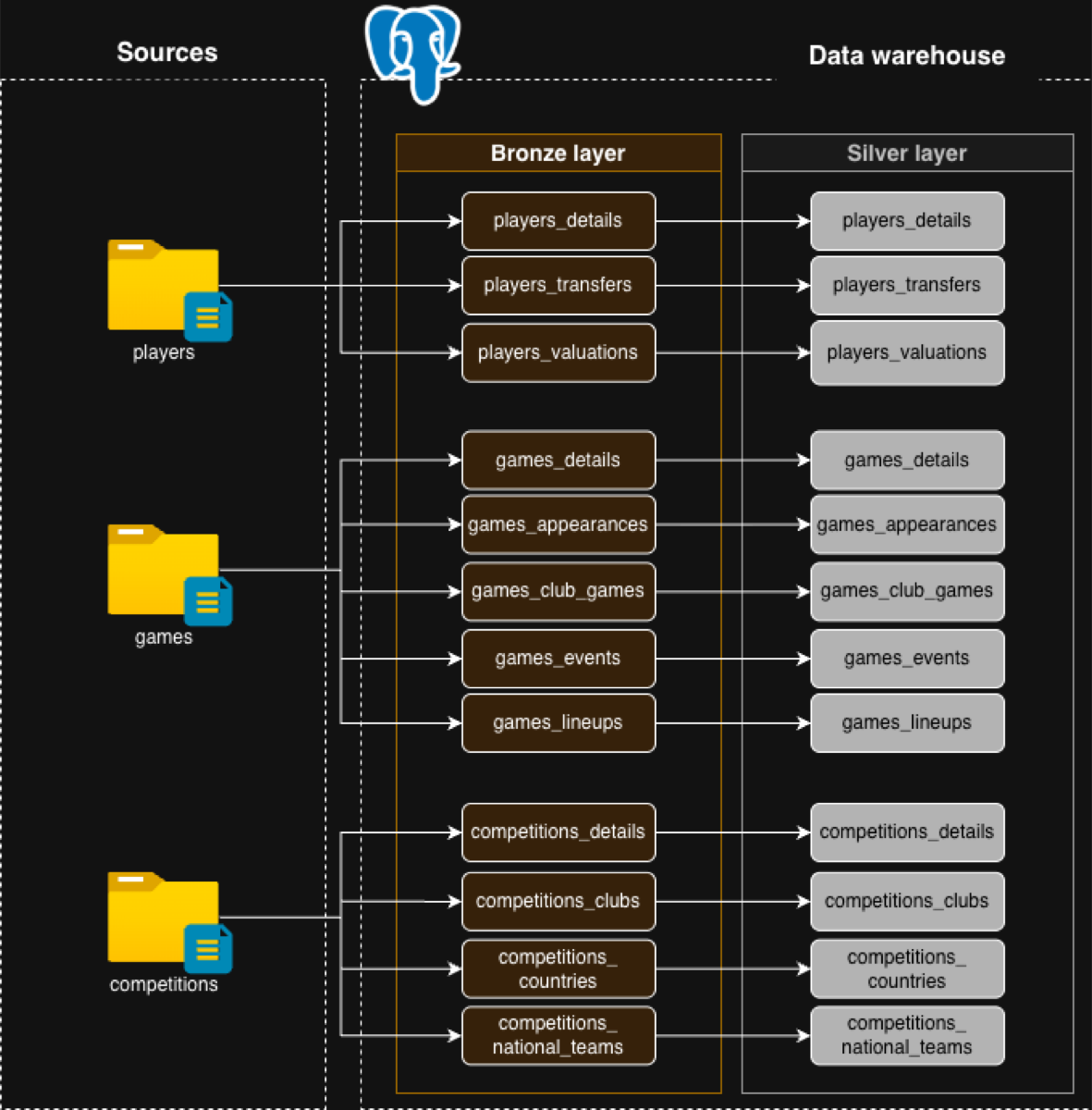
A lesson learned: I got one column's data type wrong in silver, and only noticed when it caused problems in the gold layer. I had to go back and fix it. Get types right in silver — the gold layer should only build data products, not fix data.
What's done, and what's next
Done in silver
- All the cleaning techniques
- Derived columns
- Data enrichment
- Normalisation
Saved for gold
- Business rules and logic
- Aggregations
- Data integration