Grassroots football players have very little access to objective performance data. Professional footballers have analysts, tracking systems and performance reports. Amateur players generally just have their memories of the match.
The idea
Let the camera do the analysis
Use computer vision to turn ordinary football footage into player-level performance insights.
Where I am today
Current capabilities
From a single camera, GoalPro detects and tracks every player and the ball, maps their positions onto a tactical view, and builds live match stats.
Player tracking, live tactical map and match stats.Raw footage (left) and what GoalPro sees (right).
The technology
What's under the hood
Object detection (RF-DETR)
Computer vision
Player and ball detection
Video processing
Multi-object tracking (ByteTrack)
Jersey number recognition
Team classification
Data extraction and analysis
My process
From footage to stats
Collect and label images.
Train and configure a detection model.
Test how accurately it identifies objects.
Process video frame by frame.
Turn detections into meaningful football events.
Transform those events into useful statistics.
Deep dive
Inside the tracking pipeline
Detecting players in a single frame is only half the job. To build stats for each player, GoalPro has to follow every player across the whole match — and keep their identity correct the entire time.
The three tracking errors
In object tracking, there are three main types of error. Because of them, we always need a post-processing stage to make the final tracking accurate and consistent.
Lost track IDs
The tracker loses a player's identity.
ID swaps
The identities of two players get swapped.
ID switches
A player's tracking ID incorrectly changes.
How the pipeline works
Object detection
Online tracking (ByteTrack)
Tracklet error detection
Tracklet splitting
Tracklet reconnection
Final corrected tracking
Detection and online trackingPost-processing
Component 1
Online tracker
Performs the initial tracking and generates tracklets — short pieces of a player's path.
Uses ByteTrack, which includes a Kalman filter to predict where each player moves next
Relies on each player's motion and direction, plus the overlap (IoU) between detection boxes
Doesn't use appearance features in our current setup — we don't need them at this stage
Component 2
Post-processing
Detects and corrects tracking errors, rebuilds the tracklets and produces the final tracking results.
Stage 1 — Split: break long tracklets wherever a tracking error is detected
Stage 2 — Connect: rejoin the smaller tracklets that belong to the same player, rebuilding each player's full trajectory
Splitting and reconnecting, step by step
We spot errors using jersey number recognition and team classification. If a tracklet suddenly shows a different jersey number or team, something has gone wrong — so we split it there. Then we use the same information to work out which pieces belong to the same player and reconnect them.
Online trackerByteTrack output, with errors
Tracklet 1
#7#10 — ID switch!
Tracklet 2
#10 — then lost
Tracklet 3
#7
0sTime →70s
Stage 1Split where the jersey number changes
Tracklet 1
1a · #71b · #10
Tracklet 2
#10
Tracklet 3
#7
Stage 2Reconnect tracklets with the same identity
Player #7
1a3
Player #10
21b
Result: each player has one complete, correct trajectory for the whole match.
Why player identity is the key
Having something distinctive for each player — here, jersey numbers and team — makes both stages far easier. Without them, post-processing becomes much more complicated and computationally expensive.
The online tracker also gives us information across many frames. So instead of reading a jersey number from a single frame, we use every observation in the tracklet. One blurry or misread frame can't cause a wrong assignment.
7717?777→ Tracklet identity: #7
The main point
Our final tracking accuracy doesn't depend only on the online tracker. A significant part of it comes from post-processing: detecting errors, splitting incorrect tracklets and reconnecting them using reliable player identity information.
Stages of development
How GoalPro was built
From pen and paper to a trained model, one stage at a time.
1
Prove the MVP
Tracking stats by hand
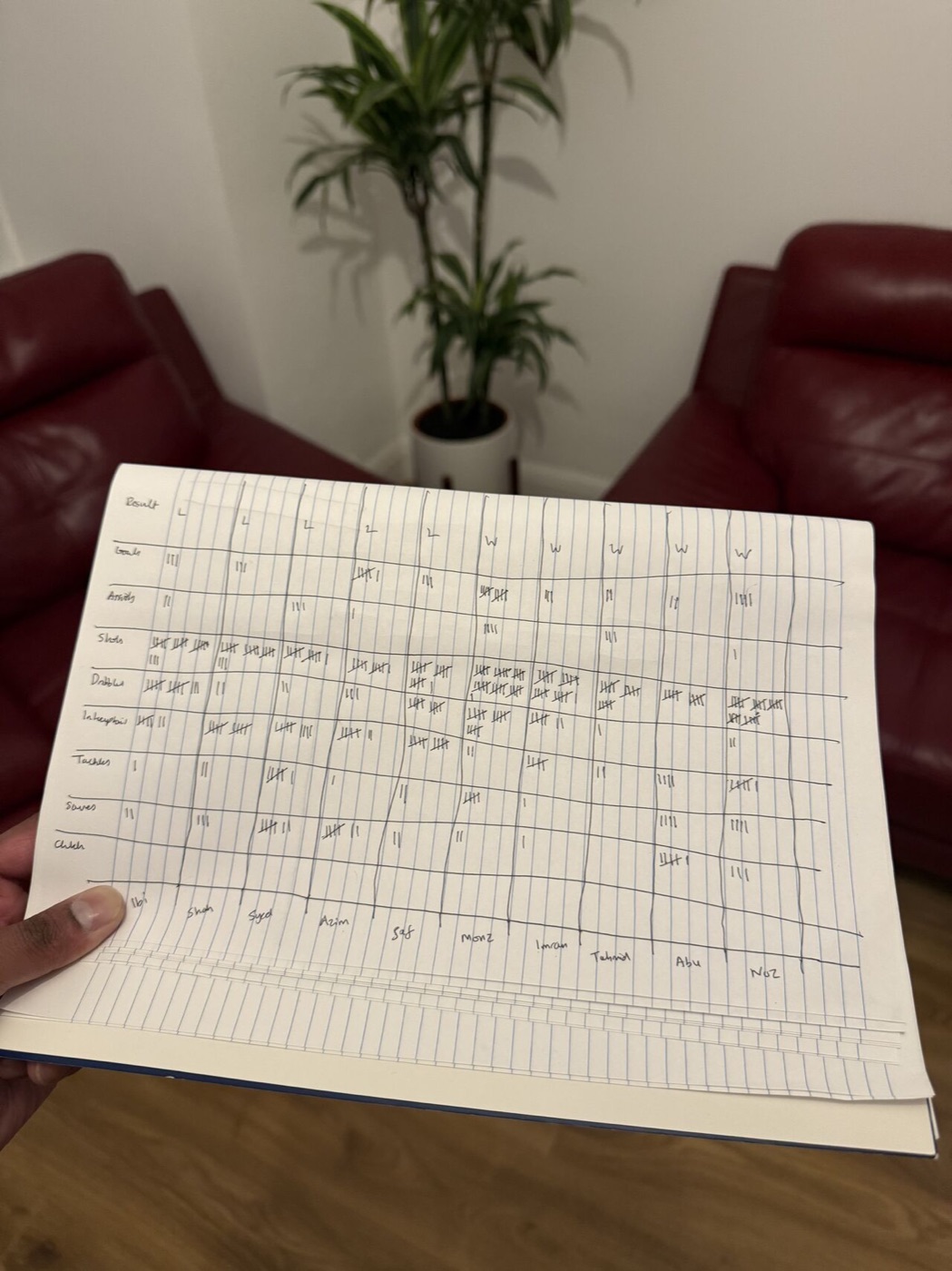
Before building anything, I needed to know: do people even want this? So I tracked player stats manually with a pen and paper — goals, assists, shots, dribbles, interceptions, tackles, saves and clutch moments.
2
Label the data
Weeks of annotating
Doing it by hand took far too long, so I needed to automate it with computer vision. That meant weeks of tagging players and the ball in match footage, often for 3+ hours a day, to create the training data.
3
Train the model
Player and ball detection
I fine-tuned an RF-DETR object detection model on the annotated data, so it can find every player and the ball in each frame of a match.
4
Next stage
Event detection
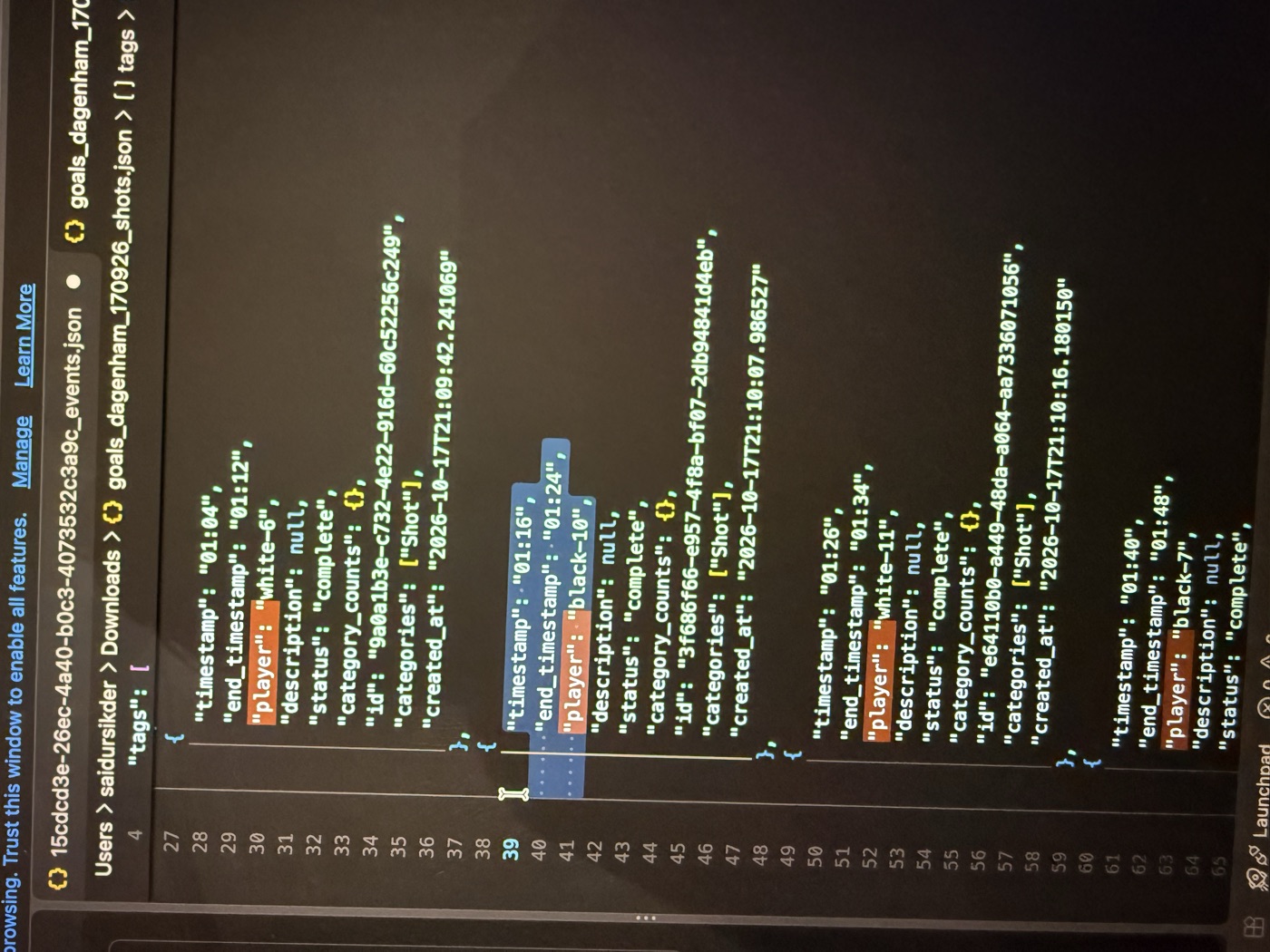
Next, the model needs to recognise what happens in a match, not just who is where. Here are shots I've tagged — with timestamps and the player who took them — which I'll use to train the model to detect shots automatically.
Product roadmap
What's next for GoalPro
The next steps to make GoalPro fully automatic: from detecting more of what happens in a match to tracking players without special equipment.
1
In progress
Shot detection
Automatically detect shots, trained on the shots I've already tagged.
2
Planned
Stats dashboard
A dashboard where players can explore their stats.
3
Planned
More events
Detect other events, such as tackles.
4
Planned
Non-bib tracking
Track players accurately without the custom bibs used for the MVP.
The end result
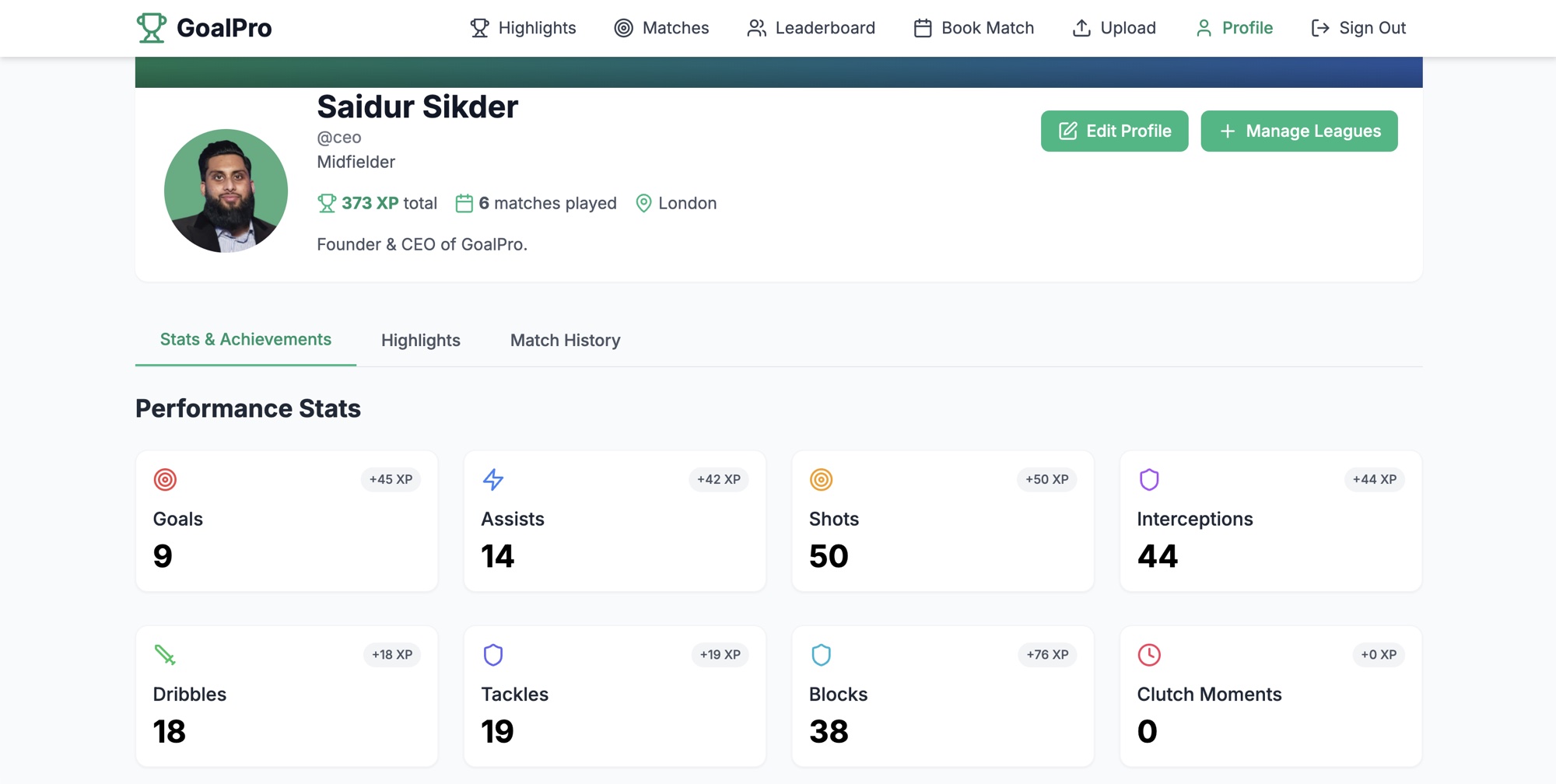
An example player profile
Every match a player plays builds their profile: performance stats, highlights and match history — the kind of data that used to be reserved for professionals.
Have an idea?
Interested in GoalPro?
Whether you run a venue, a league or a team, or you're just curious about the artificial intelligence, I'd love to hear from you.